跳到主要内容
darkmi's blog — 分享生活智慧 记录技术点滴
Sina Weibo
Zhihu
GitHub
Gitee
菜单
index
blog
hao
tool
Category
tag
archive
首页
›
other
›
如何关掉pycharm的拼写检查
如何关掉pycharm的拼写检查
发表于:
other
| 作者: darkmi | 日期: 2020/01/08 08:00
标签:
pycharm
字号:
A-
A
A+
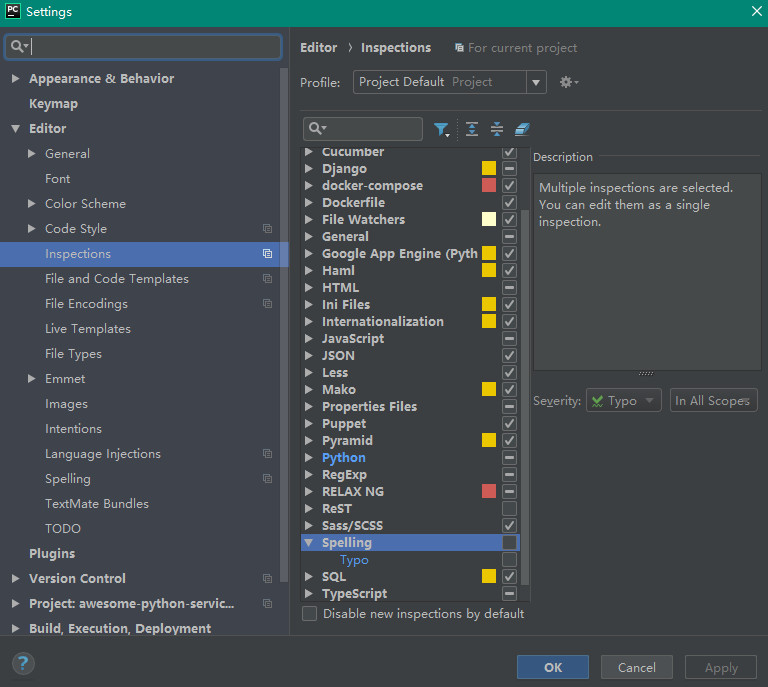
在Settings页面,选择 Editor=》Inspections,在右侧取消Spelling和Typo的选中状态即可。
永久链接
搜索
分类目录
other (520)
java/j2ee (306)
lnmpa (237)
sitebuild (143)
mysql/oracle/postgresql (126)
os/software (74)
computer (39)
redis/memcached/mongo (31)
arch/management (17)
mac/iphone/ipad/android (11)
python (7)
lnmp (3)
DB/ES (1)
日志存档
2026 (2)
2024 (5)
2022 (3)
2020 (5)
2018 (4)
2017 (51)
2016 (102)
2015 (68)
2014 (201)
2013 (483)
2012 (78)
2011 (85)
2010 (78)
2009 (129)
2008 (220)
2007 (1)
Powered by
https://www.darkmi.com
切换主题
切换主题
返回顶部